FEATURES
All features can be turned on/off in Tuneables.c
- Player Join/leave messages.
in Tuneables.c use
m_SessionFeed to enable/disable join messages for players
- Custom Spawn loadouts.
in Tuneables.c use
m_AdvancedLoadouts to enable/disable custom loadouts
in "mpmissions\DayZSurvival.chernarusplus\ScriptedMods\Modules\AdvancedLoadouts\AdvancedLoadouts.c"
set
m_StaticLoadouts to enable/disable static loadouts
set
m_RandomizedLoadouts to enable/disablerandom loadouts
set
m_SpawnArmed to enable/disable spawn players with a gun
This feature allows the fresh spawn players to load in with preset gear (both random and static).
To Configure the type of items to spawn on your players check the folder "mpmissions/DayZSurvival.chernarusplus/ScriptedMods/LoadOuts" Each Category is in a separate .txt file If you wish to remove an item or add, make sure you follow the same layout as the file comes in. The Script will randomly select an item from each category. If you wish to remove a certain category simply leave the file empty or delete it. You can modify the loadouts while the server is running! After you make your edits login as admin in game and use the Admin command /updateLoadouts
- No Stamina
in Tuneables.c use
m_StaminaStatus to enable/disable stamina
- No Hunger
in Tuneables.c use
m_HealthStatus to enable/disable hunger
- No Thirst
in Tuneables.c use
m_ThirstStatus to enable/disable thirst
- Debug Monitor
in Tuneables.c use
m_Debugmonitor to enable/disable debug monitor
- Airdrops
in Tuneables.c use
EnableAirdrops to enable/disable airdrops
in Tuneables.c use
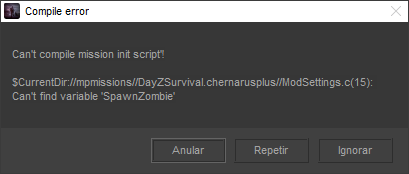
SpawnZombie to enable/disable zombies at airdrops
in Tuneables.c use
ShowSignal to enable/disable smoke at airdrops
- Zombie Hordes (This is an event!)
in Tuneables.c use
m_InfectedHordes to enable/disable random zombie hordes
you can edit the hordes changing DayZSurvival.chernarusplus\ScriptedMods\Moduels\ServerEvents\InfectedHordes.c
- Custom SafeZone with godmode.
in Tuneables.c use
m_SafeZone enable/disable safezone
This feature allows you to place a safezone anywhere on the map with a radius you wish for. To modify the safeZone area check this file " mpmissions/DayZSurvival.chernarusplus/ScriptedMods/Modules/SafeZone/SafeZoneFunctions "
- Spawn Custom Buildings anywhere on the map
This feature is just an easy way to place your CustomBuildings code in a tidy spot and not in the main init where shit gets clustred. Check the file " mpmissions/DayZSurvival.chernarusplus/ScriptedMods/BuildingSpawner.c" it does not matter how you spawn your buildings or set their direction orientation etc, just make sure the script is inside the Void() to get executed on server startup .
A nice way to get buildings imported is to use the COM (Community Offline Mode from Arkensor). You can place buildings and extract their info. Thank @DannyDog for that feature
- Chat Based Admin Tool set.
Simply Add your steam 64 ID into the file mpmissions/DayZSurvival.chernarusplus/ScriptedMods/Admins.txt" Set a server admin password in the server.cfg, in game login using the password. login myPassword The Admintoolset feature can be found here:
https://pastebin.com/GGrCDg3f
- Player score tracking system and Kill Activity tracker with timestamps
This feature creates two files in the server profile ( if you use -instance command line it would be placed there ) the server profile is in Documents folder by default (its where your logs are). provides detailed kill log and records players stats such as total deaths and total kills on the server. This feature is implemented within the mod.
- Kill messages
Shows who killed who, committed suicide.
- Custom MOTD based within the mission (CURRENTLY NOT WORKING)
Random preset messages popup for all players. To change the messages check the file " mpmissions/DayZSurvival.chernarusplus/ScriptedMods/MOTDMessages.c "

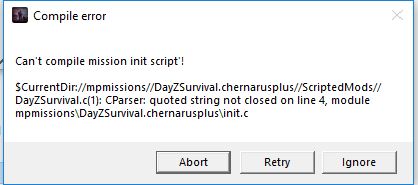
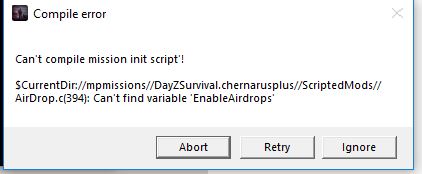
 sorry
sorry keep the reports coming!